How to Use AI Agents to Plan Your Entire Work Week
Artificial intelligence has moved far beyond simple chatbots and one-off task automation. Today, AI agents can act like proactive digital assistants, planning, prioritizing, and even adjusting your entire work week in real time. Instead of manually juggling calendars, to-do lists, and deadlines, AI agents can help you design a smarter, more focused week that adapts as things change. If you’ve ever felt overwhelmed on Monday morning or frustrated by how quickly plans fall apart, this guide will show you how AI agents can take over the heavy lifting of weekly planning, and how to use them effectively.
By Kiwireport Staff on March 10, 2026
Artificial intelligence has moved far beyond simple chatbots and one-off task automation. Today, AI agents can act as proactive digital assistants, planning, prioritizing, and even adjusting your entire workweek in real time. Instead of manually juggling calendars, to-do lists, and deadlines, AI agents can help you design a smarter, more focused week that adapts as things change.
If you’ve ever felt overwhelmed on Monday morning or frustrated by how quickly plans fall apart, this guide will show you how AI agents can take over the heavy lifting of weekly planning—and how to use them effectively.
What AI agents are and why they’re different
AI agents are systems designed to perform tasks autonomously based on goals you define. Unlike traditional productivity tools that wait for instructions, AI agents can analyze context, make decisions, and execute actions across multiple tools.
For example, an AI agent can:
- Review your calendar, emails, and task list
- Identify priorities and time constraints
- Propose a structured weekly schedule
- Adjust plans when meetings are added or deadlines change
What makes AI agents powerful is their ability to work continuously in the background. Instead of you checking five different apps to plan your week, the agent synthesizes everything into one actionable plan.
Popular tools offering early forms of AI agents include Notion AI, Motion, Reclaim, ClickUp AI, and custom agent workflows built using platforms like AutoGPT or LangChain.
Setting your goals and constraints for the week
Before an AI agent can plan your week effectively, it needs clarity. Think of this as giving your digital assistant the rules of the game.
Start by defining your weekly goals. These might include project milestones, meetings that must happen, or outcomes you want to achieve. Clear goals allow the agent to prioritize correctly rather than simply filling time slots.
Next, set constraints. These include:
- Working hours and preferred focus times
- Meetings that are fixed versus flexible
- Personal commitments or non-working blocks
- Energy patterns, such as deep work in the morning or lighter tasks in the afternoon
The more context you provide, the smarter the plan becomes. Many AI tools allow you to input these preferences once and reuse them every week, refining them as the agent learns your habits.
Letting AI build and optimize your weekly schedule
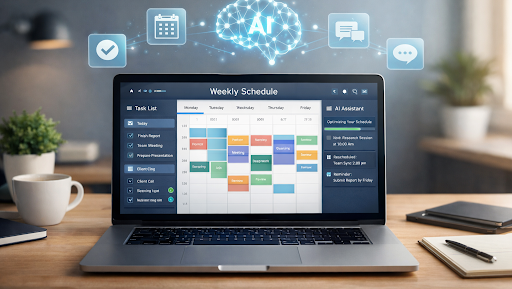
Once goals and constraints are set, the AI agent can generate a complete weekly plan. This usually includes time-blocking tasks, grouping similar activities, and spacing demanding work to avoid burnout.
Instead of a rigid schedule, most AI agents create dynamic plans. If a meeting runs long or a new task appears, the agent recalculates the rest of the week automatically. This is especially useful for roles with frequent interruptions or changing priorities.
A typical AI-generated week might include:
- Dedicated focus blocks for high-priority work
- Automatically scheduled breaks to prevent fatigue
- Buffer time between meetings
- Suggested deadlines for tasks that don’t yet have one
Rather than reacting to your calendar, you start the week with intention—and the AI helps you stay on track without constant manual adjustments.
Using AI agents to manage tasks, not just time
Planning your week isn’t only about scheduling, it’s also about execution. AI agents can help manage tasks by breaking down large projects into smaller steps and assigning them to realistic time slots.
For example, instead of listing “Work on report,” an AI agent might divide it into research, drafting, editing, and review sessions spread across the week. This makes progress visible and prevents last-minute rushes.
Some agents can also:
- Flag tasks that are at risk of missing deadlines
- Suggest what to postpone when the week becomes overloaded
- Remind you why a task matters in relation to your goals
This turns weekly planning into an ongoing collaboration between you and the AI, rather than a static plan you forget by Tuesday.
Reviewing and improving your week with AI insights
At the end of the week, AI agents can analyze what actually happened versus what was planned. This feedback loop is where long-term productivity gains really show up.
The agent can highlight patterns such as:
- Tasks that consistently take longer than expected
- Meetings that disrupt focus blocks
- Times of day when you’re most productive
Based on this data, it can suggest adjustments for future weeks, such as shorter meetings, fewer context switches, or more realistic task durations. Over time, your weekly plans become more accurate and better aligned with how you truly work.
Instead of relying on guesswork, you’re using data-driven insights to continuously improve your workflow.
Why AI-powered weekly planning is worth it
Using AI agents to plan your entire work week isn’t about giving up control—it’s about removing friction. You still decide what matters, but you no longer have to manage every detail manually.
With the right setup, AI agents can help you:
- Start each week with clarity
- Stay flexible without losing focus
- Reduce decision fatigue
- Spend more time doing meaningful work
As AI tools continue to evolve, weekly planning may soon feel less like a chore and more like a strategic advantage. The future of productivity isn’t about working harder—it’s about working with smarter systems that adapt alongside you.